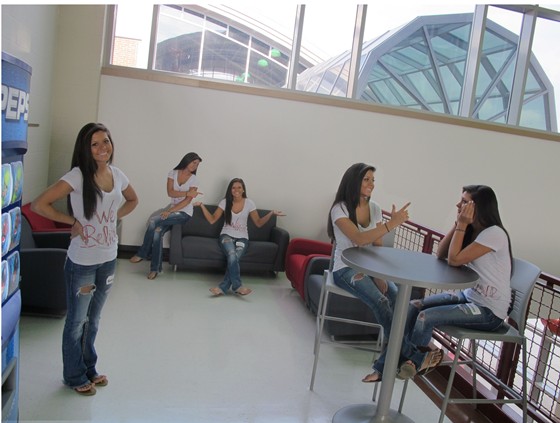
Set camera on stand and took pictures in different places with the camera never moving. Then masking myself in and out of the picture using different blending tools to bring in my shadows, ect.
The camera was to stay in the same spot so that when you blended all the pictures together the backgrounds would be the same which would make it easier to mask myself in and out of the pictures and show up in the right place without much trouble. First you upload the pictures to a designated Photoshop folder and you open all images in Photoshop by blending them like I said above. Once that is done the different layers showed up on the side and I unchecked the little eyeball to make some layers not visible (the ones that I did not need at the time). I selected myself and added a layer mask each time then clicked the eyeball again to make the layer reappear. When I did this a new clone of myself would show up exactly where it was in the original picture except now it was on a new picture completely, hence the clone affect having more of myself in one picture. There were a few situations where I had to use the layer mask and paintbrush to brush back in parts of myself like shadows that I had lost. I did this to make the pictures overall look more real and believable that there really was five of me hanging out with…myself hehe.
Comments: 0
There are no comments yet, be the first to write a comment!
 Teri Alexys Rookard