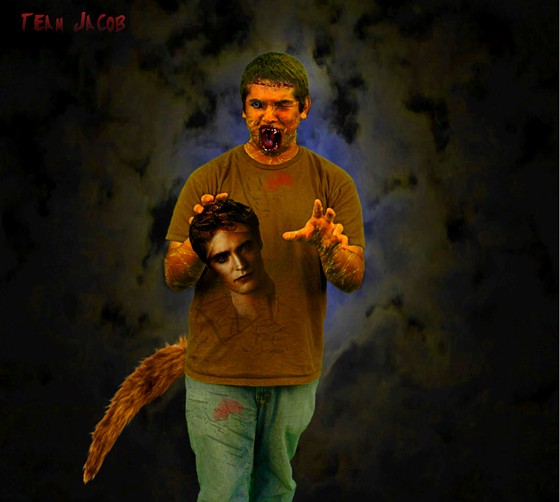
This started out as a person in front of a green background. Using the selection, masking, layers and other tools I turned this dude into a monster.
This project was somewhat a challange. I started out with a dude that was half way smiling with his eyes squinting... not a very idealistic start to a monster. First, I got on google and looked for a grusome looking texture and saved it to my Monster Mix folder. I then quick selected pieces of the texture and used the move tool to drag them over to the dude. I placed the texture over his face, arms and hands. I then changed the layers to "overlay" at 70% which gave a more skin-looking vibe and more realistic. To make the texture lay only over the parts I wanted, I added a layer mask and just brushed out the parts I did not want. Once all his skin was monster-looking I got into the fun stuff. I went back to google and found a wolf eye. I blended the wolf eye in over the dudes real eye and resized it using ctrl+t. To add effect to the right eye I just selected using the polygonal selection tool his real eye and warped it shut giving him a more gross look. My eyes were looking pretty good so I then found a monster face on google in which I liked the scary mouth. I saved that to my Monster folder also and selected only the mouth of the picture and moved it to my guy. Using the refine edge tool, a layer mask and a few brush techniquies I got the mouth to blend pretty well with the overall look. I also warped the mouth to fit the way his face was and add on more of a chin because I had little to work with and the mouth kept hanging over the edge of the face making it look unrealistic. Once all the basics were finished I cropped in a cut on his forehead that I selected out of a different picture and resized/blended it in to give the full effect. For the blood and scratches that are on his clothing I just went to the Z drive and loaded some brushes which I just stamped where I wanted them and added layers masks to paint in and out parts I did not want and also to make them fade more. The tail was simple...I selected it off a wolf, moved it over, refined the edge and then blened it to make it look like it was coming from behind him. Lastly I decided to move in Edward Cullens head (compliments to the Jacob-Werewolf-Look-Alike hehe). That was easy also. I changed the layer of that to "hard light" because it gave Edward a more dark and sinister look. Now that my Monster was completed all I had to do was select him and move him over onto the moonlight background that I had chose from google and vooah-lah, Monstaaa Jacob came to life!
 Teri Alexys Rookard
I like your monster.
11/4/2011 6:16 AMMakayla McClanahan Reply